
Increase VRAM on Apple Silicon for Local LLMs
Override the default VRAM cap on Apple Silicon to allocate more unified memory to GPU tasks like running local LLMs.
Apple Silicon’s unified memory architecture shares the same high-speed RAM between CPU and GPU — no discrete GPU required. This is why you can run large language models locally on a MacBook without a separate graphics card.
The Default VRAM Cap
macOS doesn’t expose 100% of your RAM as VRAM. On a 64GB machine, the Metal GPU driver typically caps VRAM at ~75–80% of total RAM — roughly 51GB out of 64GB:
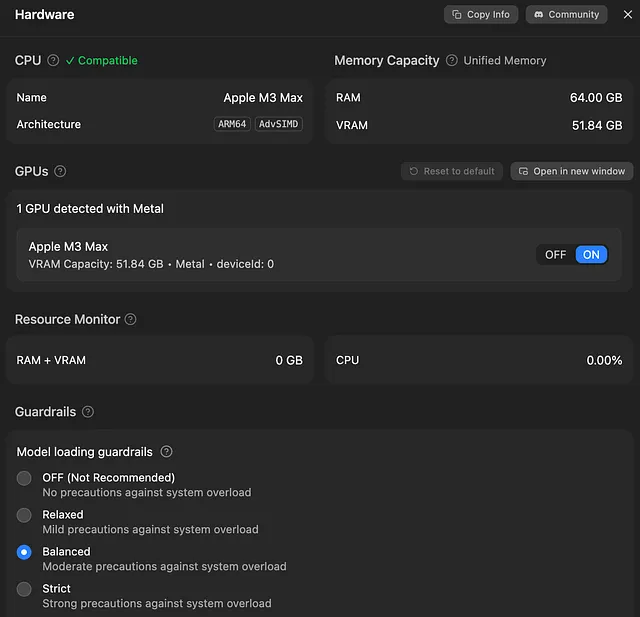
That ~12GB gap is reserved for macOS and background processes. Reasonable for general use — but if your machine is dedicated to LLM inference, that’s 12GB of wasted context window or a smaller quantization than necessary.
Override the VRAM Limit
One sysctl command adjusts the GPU wired memory limit at runtime:
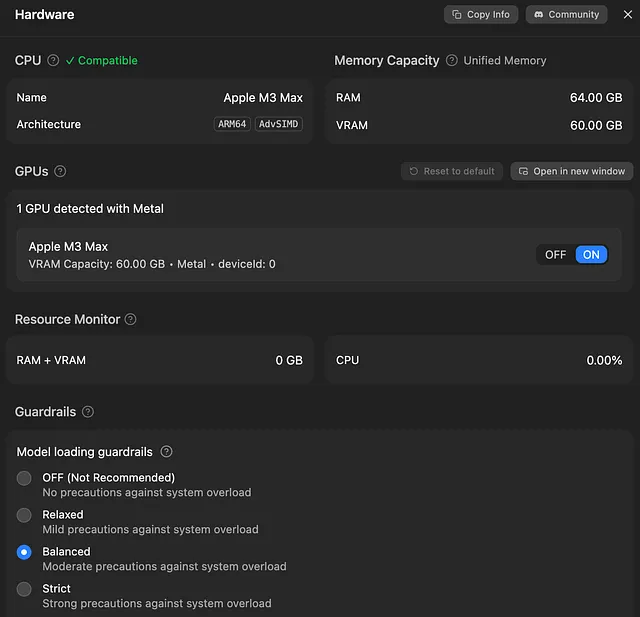
sudo sysctl iogpu.wired_limit_mb=61440
The value is in megabytes. Calculate it as desired_GB * 1024:
# 60GB → 60 * 1024 = 61440
sudo sysctl iogpu.wired_limit_mb=61440
Verify the change
sysctl iogpu.wired_limit_mb
iogpu.wired_limit_mb: 61440
```
No reboot required — takes effect immediately. Restart LM Studio (or whichever app reads VRAM) to pick up the new limit:
How Much to Allocate
Leave at least 4–8GB for macOS. Allocating 100% will cause system lockups, beachballs, or a hard reset.
☕ Support My Work
If you found this post helpful and want to support more content like this, you can buy me a coffee!
Your support helps me continue creating useful articles and tips for fellow developers. Thank you! 🙏
Persist Across Reboots
The sysctl change resets on every reboot. Create a Launch Daemon to apply it automatically.
Create the plist file:
sudo tee /Library/LaunchDaemons/com.local.iogpu-wired-limit.plist
Label
com.local.iogpu-wired-limit
ProgramArguments
/usr/sbin/sysctl
iogpu.wired_limit_mb=61440
RunAtLoad
EOF
```
Replace 61440 with your desired value from the table above.
Load the daemon:
sudo launchctl load /Library/LaunchDaemons/com.local.iogpu-wired-limit.plist
Verify it’s registered:
sudo launchctl list | grep iogpu
> - 0 com.local.iogpu-wired-limit
The VRAM override now applies on every boot — no manual intervention.
Remove the Override
To revert to default macOS behavior:
# Unload the daemon
sudo launchctl unload /Library/LaunchDaemons/com.local.iogpu-wired-limit.plist
# Delete the plist
sudo rm /Library/LaunchDaemons/com.local.iogpu-wired-limit.plist
# Reset to default (0 = system default)
sudo sysctl iogpu.wired_limit_mb=0
Important Notes
- This works on macOS Sonoma (14.x) and later with Apple Silicon
- The
iogpu.wired_limit_mbparameter replaced the olderdebug.iogpu.wired_limitkey - No SIP disabling required — this is a runtime kernel parameter, not a protected config
- Setting the value to
0restores default behavior - Monitor Activity Monitor’s Memory tab after increasing — if memory pressure stays red, reduce the allocation